Portable Backup4all 4.7.270
Updated on 15 May 2012
By Anthony Buckner
By Anthony Buckner
Specifications
License:
Shareware (Free to try)
Updated:
Downloads:
1576
Platform:
Windows 7/Vista/XP
Publisher:
Softland(more)
Website:
User Reviews:
Other versions:
3.9.263
Do you like
Portable Backup4all?
Publisher's Descriptions
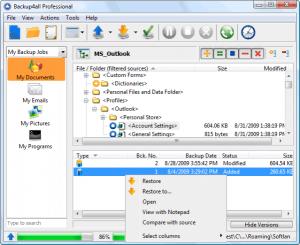
Backup4all for U3 represents a portable version of Backup4all that you can take with you wherever you go. All you need is a U3 compatible USB device, and you can start using Backup4all for U3 from any Windows 2000 or XP PC, anywhere.
Backup4all for U3 can be configured to automatically run a backup job when the U3 smart USB drive is connected. Think of the time spared as you will have to simply plug-in the U3 USB device to execute a backup.
Using Backup4all for U3 you can easily back up to any local or network drive, backup to FTP, backup to CD/DVD, or other removable media (such as USB drives).
Here are some advantages for using Backup4all for U3:
Plug-and-Backup - You can configure Backup4all for U3 to automatically execute a backup job when the U3 smart USB device is plugged in.
Use Backup4all anywhere - When you install Backup4all for U3 on a U3 smart drive, you can use it anywhere a Windows 2000 or XP computer is available.
Safe and secure - When you remove the U3 smart drive from a PC, all your information is secure and leaves with you.
Portable and easy to use - U3 smart drives are small, lightweight and convenient - no bigger than a pack of gum!
No hassle - with a U3 smart drive, it’s easy to work on multiple and shared computers - because you can carry your personal PC-environment with you wherever you go.
International - Backup4all for U3 supports 14 different languages within one version! Supported languages: English, Chinese, Dutch, French, German, Italian, Norwegian, Polish, Portuguese, Romanian, Russian, Spanish, Swedish and Turkish
Backup4all for U3 can be configured to automatically run a backup job when the U3 smart USB drive is connected. Think of the time spared as you will have to simply plug-in the U3 USB device to execute a backup.
Using Backup4all for U3 you can easily back up to any local or network drive, backup to FTP, backup to CD/DVD, or other removable media (such as USB drives).
Here are some advantages for using Backup4all for U3:
Plug-and-Backup - You can configure Backup4all for U3 to automatically execute a backup job when the U3 smart USB device is plugged in.
Use Backup4all anywhere - When you install Backup4all for U3 on a U3 smart drive, you can use it anywhere a Windows 2000 or XP computer is available.
Safe and secure - When you remove the U3 smart drive from a PC, all your information is secure and leaves with you.
Portable and easy to use - U3 smart drives are small, lightweight and convenient - no bigger than a pack of gum!
No hassle - with a U3 smart drive, it’s easy to work on multiple and shared computers - because you can carry your personal PC-environment with you wherever you go.
International - Backup4all for U3 supports 14 different languages within one version! Supported languages: English, Chinese, Dutch, French, German, Italian, Norwegian, Polish, Portuguese, Romanian, Russian, Spanish, Swedish and Turkish
Do you like Portable Backup4all
Portable Backup4all Disclamer
Please be aware FindMySoft.com accepts no responsibility for the file you are downloading. The same applies to the information provided about the software products listed.
We do not allow the inclusion of any Portable Backup4all serial, keygen or crack and we disclaim any liability for the inappropriate use of Portable Backup4all.
FindMySoft advises that Portable Backup4all should be only used in accordance with the rules of intellectual property and the existing Criminal Code.
For your own protection ALWAYS check downloaded files for viruses.
We do not allow the inclusion of any Portable Backup4all serial, keygen or crack and we disclaim any liability for the inappropriate use of Portable Backup4all.
FindMySoft advises that Portable Backup4all should be only used in accordance with the rules of intellectual property and the existing Criminal Code.
For your own protection ALWAYS check downloaded files for viruses.
Advertising
Popular News
The MATE and Cinnamon editions of Linux Mint 13 Release Candidate have been rolled to the public.
Tell Drinkify what you're listening to and it will tell you what drink to get.
Your Rating
Top Downloads
2.
Opera5.
Trillian8.
AIM9.
Skype10.
Ad-Aware12.
Nero13.
Google Earth14.
Picasa15.
Winamp16.
iTunes17.
RealPlayer18.
uTorrent19.
eMule20.
WinRAR21.
BitComet22.
WinZip23.
Shareaza24.
CCleaner25.
Recuva26.
Tweak UI27.
CuteFTP Home29.
Adobe Reader30.
NewsPiperBecome A Fan!
Link To Us!
Portable Backup4all
HTML Linking Code
HTML Linking Code
Latest Reviews